
If you’re tired of squinting at your TV’s volume bar just to hear the dialogue, the Samsung HW-C43C/ZA 2.1-channel soundbar (270 W total, wireless subwoofer, DTS Virtual:X) promises a simple upgrade.
It’s currently sold on Amazon, but the most useful real-world feedback still lives in the now-archived Costco and Sam’s Club reviews. Before you click “Buy”, check out below the answers to three of the most frequently asked questions.
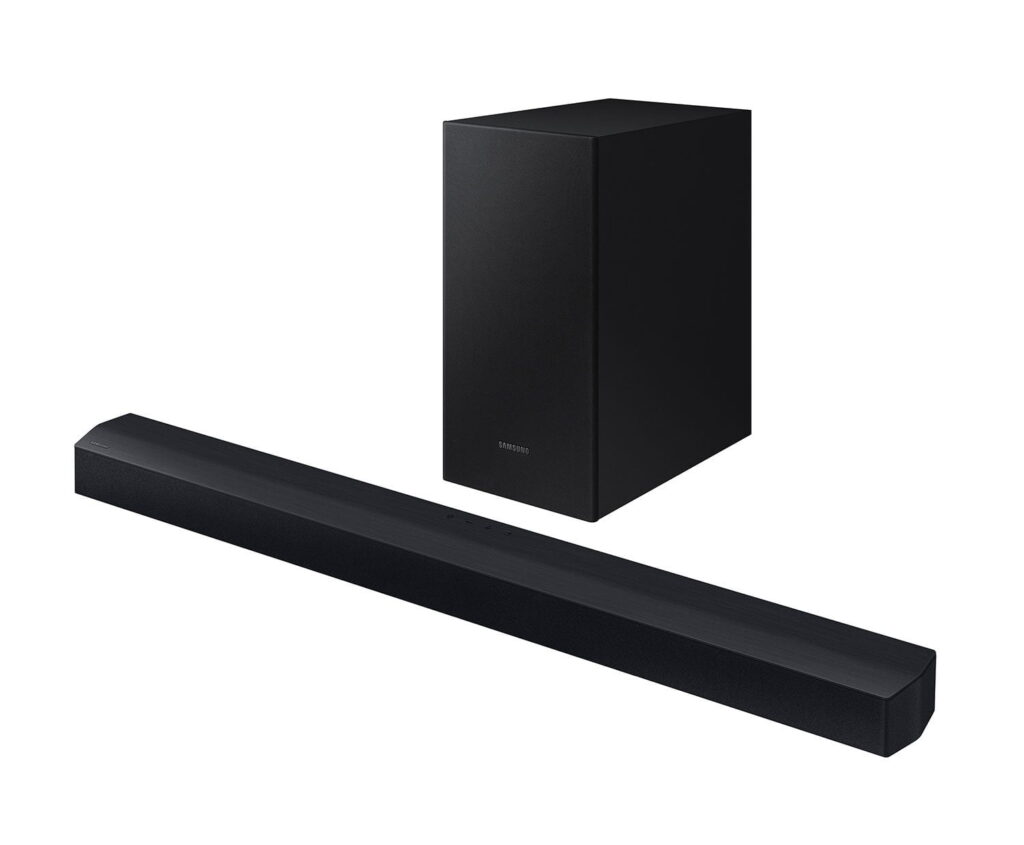
Table of Contents
- Is the Samsung HW-C43C Better than TV Audio?
- Is It Plug-and-Play, and Can I Use the TV Remote?
- Are There Any Major Drawbacks or Known Issues?
- Quick FAQ from Customer Service Responses
- Final Verdict
Is the Samsung HW-C43C Better than TV Audio?
Yes — for about 85% of owners, the difference is night-and-day for everyday TV and movie watching. The sound is crisp, dialogue is clearer, and the wireless subwoofer adds just the right thump without turning your living room into a nightclub.
DTS Virtual:X gives a modest sense of width and even a little height; several people said they could hear effects moving left-to-right like a mini theater.
On getting the volume right, one reviewer summed it up perfectly: “You know how you have to turn up TV volume just to hear the dialogue and then it’s too loud when your wife yells something and you have to turn it down to hear her? Well you don’t have to do this for the soundbar as the sound is clear enough and volume isn’t overwhelming.”
For normal viewing distances in average living rooms, it’s more than good enough — and the price includes the subwoofer, which many people appreciate in this range.
Is It Plug-and-Play, and Can I Use the TV Remote?
It’s a true plug-and-play process for most users: plug in the subwoofer (it pairs itself), connect the included Optical Cable to your TV, and you’re done. The soundbar even turns on automatically with the TV using the Auto Power Link feature.
The catch, and the single biggest complaint, is the lack of an HDMI-ARC port. While optical works perfectly for audio, it doesn’t support the universal HDMI-CEC protocol that allows your TV remote to control the soundbar’s volume and power.
Whether you can use one remote depends on your TV:
- If you own a Samsung TV (2017 or later): Your TV remote will likely control the soundbar’s volume seamlessly over the optical connection, thanks to Samsung’s proprietary protocols.
Switching to Bluetooth can sometimes solve the remote issue, but a few owners report occasional drop-outs and having to re-pair.
Are There Any Major Drawbacks or Known Issues?
The remote is confusing: The included remote is a frequent source of complaint — it’s small and not very intuitive. The printed instructions are unhelpful (4×4-inch paper with minimal text), and figuring out that the “Woofer” button rocks up/down instead of pressing straight in has tripped up more than one person.
Subwoofer pairing and reliability: While rare, a couple of subwoofers reportedly refused to stay paired or died after a few days.
User error: A handful of people even placed the soundbar on its side by mistake and wondered why it sounded muffled — the Samsung logo needs to face the ceiling.
Everything else is minor and fixable once you know the tricks (like using the EQ), but the remote’s design is a consistent frustration.
Quick FAQ from Customer Service Responses
The WOOFER button on the remote does nothing.
- Rock the button up or down (don’t press it straight in) to adjust bass from -6 to +6. Pressing straight in is the quick shortcut to reset the volume to 0.
The soundbar is muffled or weak.
- Make sure the SAMSUNG logo is facing the ceiling, not toward you. Wrong orientation points the speakers into the table.
Sound is quiet even at maximum volume.
- Check your TV’s audio settings. Set Digital Output Audio Format to PCM instead of Dolby/Bitstream. PCM is a stereo signal that is noticeably louder on 2.1 systems.
Dialogue gets buried during movies.
- Turn on Voice Enhance mode on the soundbar remote; it lifts voices over effects nicely. For even better results, use the custom EQ — see our tuning guide.
No HDMI – can it still turn on/off with my Samsung TV?
- Yes. Auto Power Link will turn your soundbar on automatically. After connecting the optical cable, set the soundbar to D.IN mode by pressing Source on the remote or soundbar. Press and hold the left arrow on remote for 5 seconds until Auto Power Link shows on the display.
Subwoofer won’t connect or keeps dropping.
- Unplug and replug both the soundbar and sub. Then, press and hold ID SET on the back of the sub (5+ seconds) until the blue light blinks. Then, hold the Up arrow on the remote for 5+ seconds. A solid blue light means it’s connected.
I’m using Bluetooth and it keeps disconnecting.
- Keep devices within 30ft, move Wi-Fi routers or microwaves away, update firmware via USB from Samsung’s site, or perform a factory / hard reset (hold + and – VOLUME buttons on the soundbar at the same time for 5 seconds). “INIT OK” appears on the display, indicating the soundbar is reset.
Final Verdict
The Samsung HW-C43C/ZA is a pragmatic, budget-friendly win if you’re okay living without HDMI-ARC and can tolerate a less-than-perfect remote. For the money, you get clear dialogue, decent movie effects, and a real subwoofer — things many TVs simply can’t do. Just read the manual, orient the bar correctly, and you’ll likely join the 87% who think it’s a no-brainer upgrade.
This article contains Amazon affiliate links. If you purchase through them, we may earn a small commission at no extra cost to you — it helps keep the site running. Thanks for the support! Amazon and the Amazon logo are trademarks of Amazon.com, Inc. or its affiliates.